Film lineage
Three ways to make the tree page feel alive and part of the glass system: the controls move to the bottom right and fold beside the shrunk bar the way Filters does, the tree uses the whole screen, and tapping someone opens the mini cast page.
Round 1. From the owner's note on #442 (2026-10-10): "reworking the plus / minus to the location on the bottom right (and then it needs animation when you start pinching around: shrink toolbar / fold + / − into a single button)". Builds on the pocket capsule tab bar (#461), the filters fold (#471, prototype), the mini cast page (prototype, branch ios/mini-cast) and the sprint review. The families below are staging's real data, laid out by the app's own layoutFamily.
Today
iPhone 17 Pro Max simulator (iOS 26.5), ios/review at 2c0c6f19, staging, the smoke account. Judd Apatow (4 people), Francis Ford Coppola (62), Brad Pitt (180) and Drew Barrymore (87).
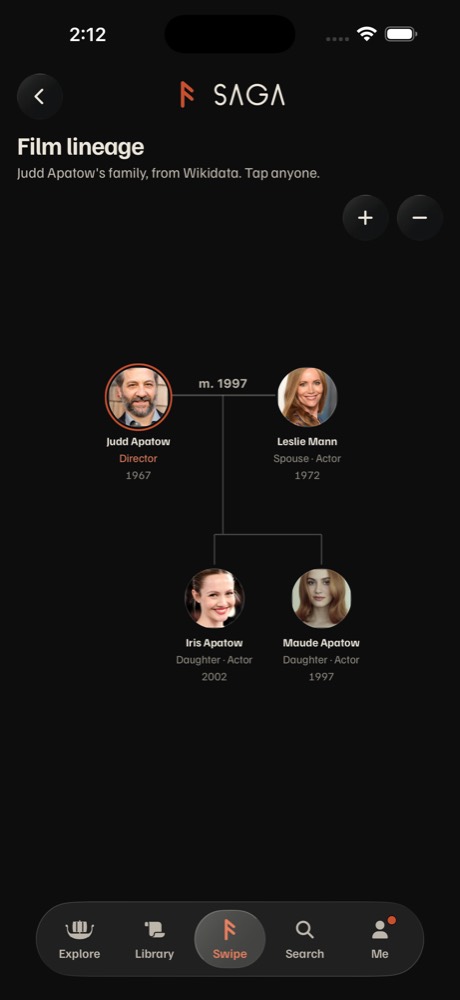 A small familyFour people at 90% (
FIT_MAX), about a third of the screen. The rest is empty.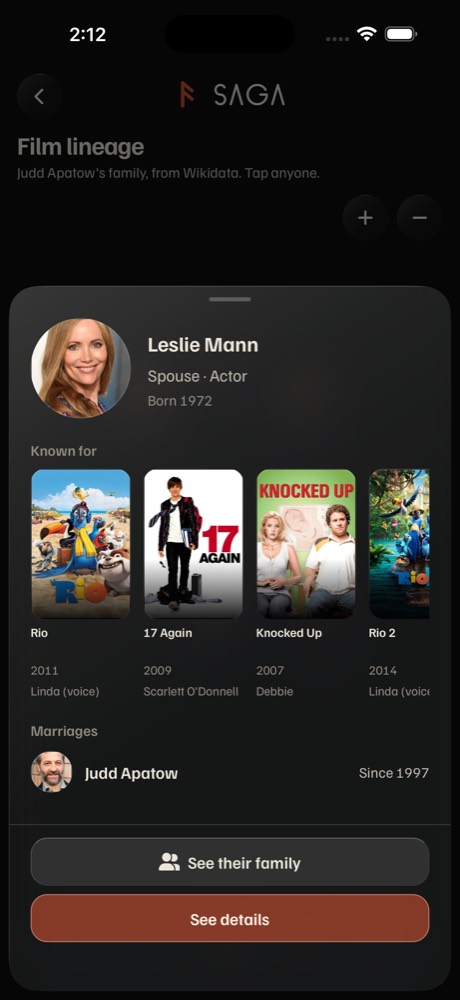 Tap Leslie Mann
FamilyMemberSheet: 674 pt of 956, two stacked buttons. The mini cast page replaces it.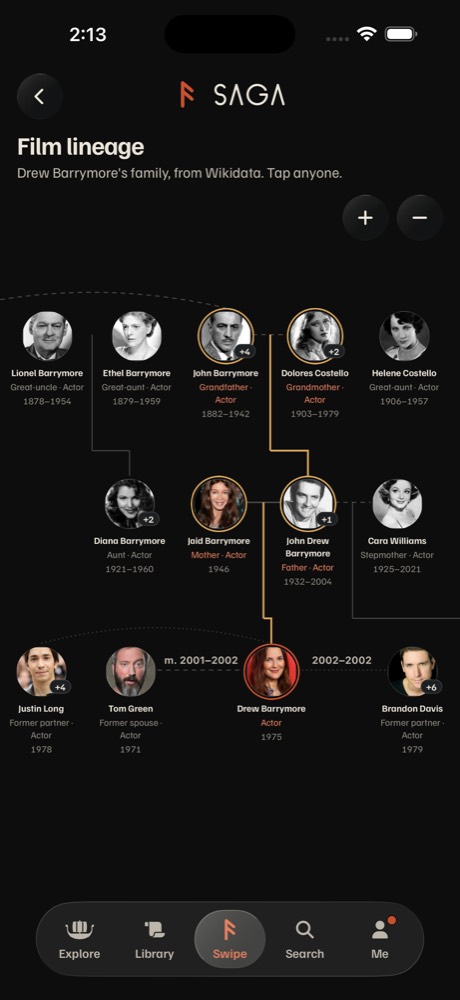 A large familyDrew Barrymore: four generations, the gilt line through the family in film. Lines run off the right edge.
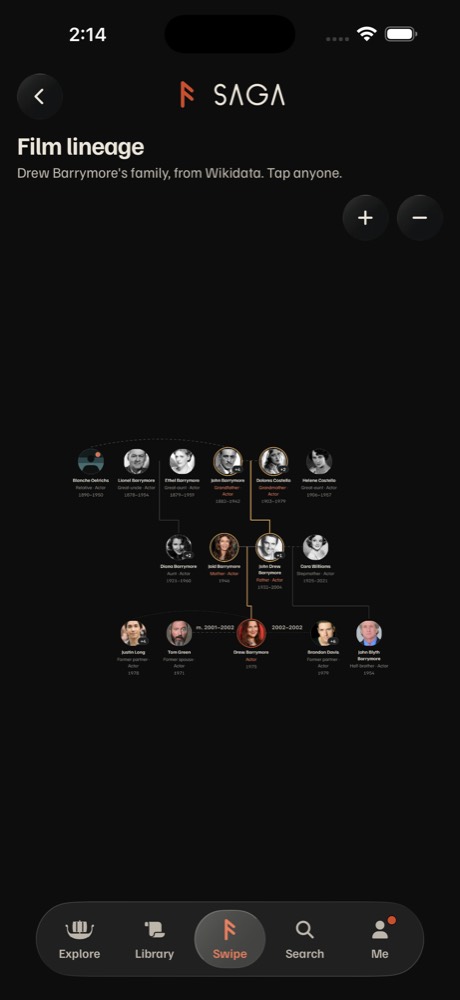 After − three timesThe controls never change, the bar stays full size, and there's no way back to the first view.
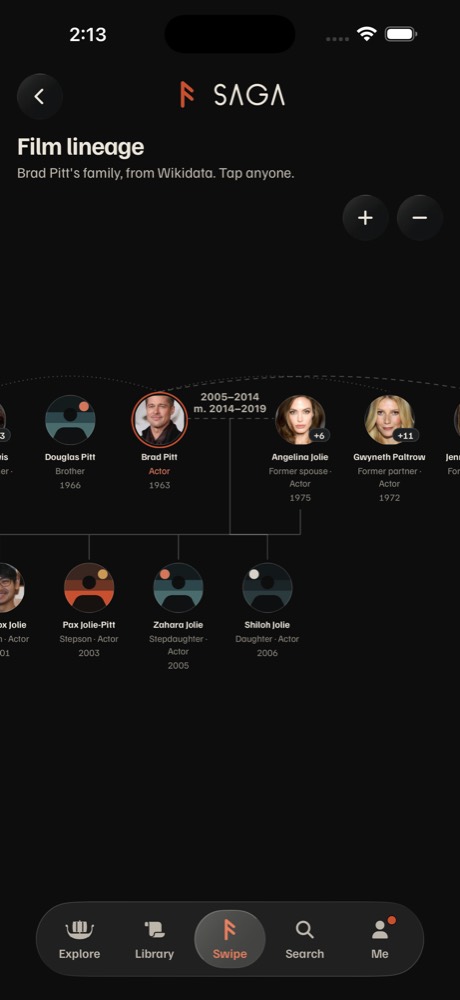 Cut at both edgesBrad Pitt at 75% (
FIT_MIN): relatives cut off on both sides with nothing to say there's more.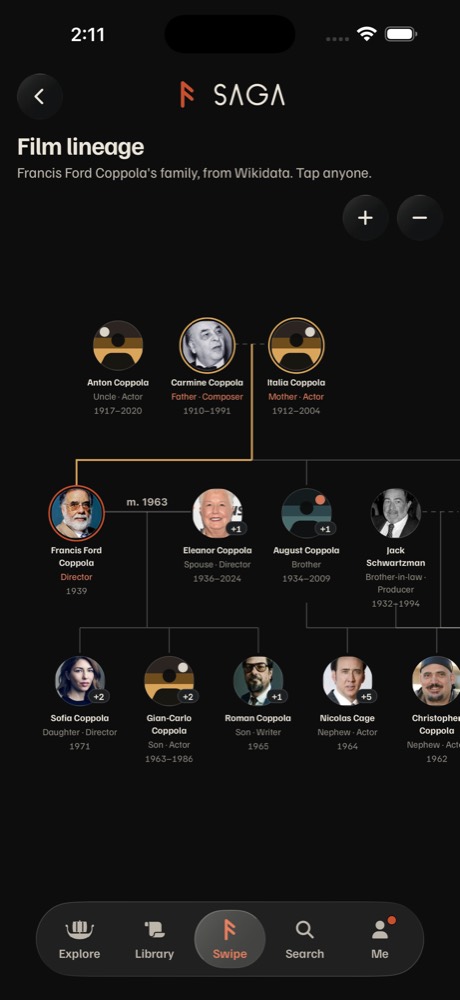 The CoppolasThree generations fill the screen; the + and − sit in the top right over the tree's empty corner.
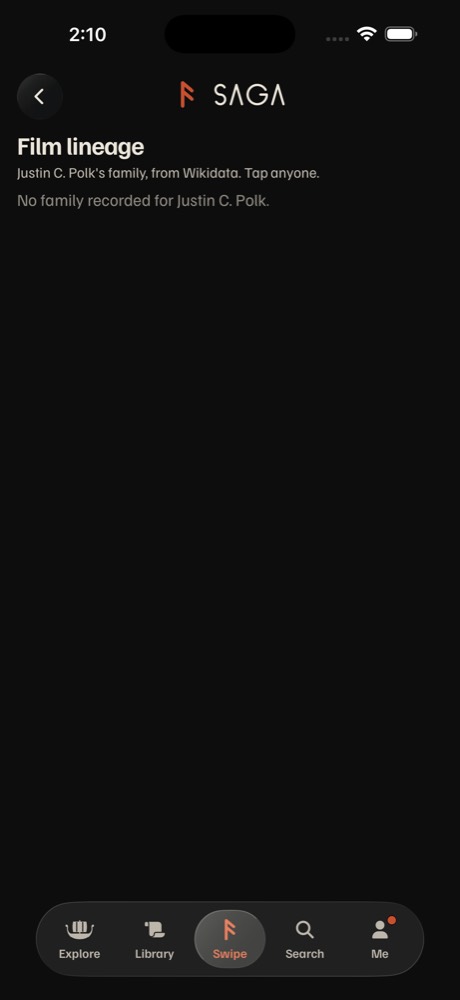 No family"Tap anyone." above "No family recorded for Justin C. Polk."
FamilyTree.tsx:20), so four people use a third of the screen.:19), with no edge fade to say you can pan.:224) in drawn glass and never react to a pinch. There's no fit: after zooming you step back with + and −. Crosshairs appear only after See their family.TAB_CLEAR), and the first view is fitted above it.lineage.tsx:37).FamilyTree's focus state survives the new start. Fix: key={data.center}.Try it: rest and exploring
Drag inside a phone to pan, scroll with ⌘ or Ctrl held to zoom (or use the buttons). Tap any portrait for the mini cast page. Timings come from @/lib/motion; springs are drawn as their nearest curve.
A small family at rest
Judd Apatow's four. What each option does with the empty screen.
A large family while you explore
Drew Barrymore's family after a pan and a pinch (C: after scrolling). How the controls fold.
Tapping someone
Jaid Barrymore, Drew's mother. Every option opens the same mini cast sheet; what differs is what the tree does behind it.
A, B and C compared
| A · Glass explorer | B · Constellation | C · Generations | |
|---|---|---|---|
| At rest | The tree fills the screen behind the top row and the bar. "Film lineage" and its line float over the top on the scroll edge. + and − sit bottom right above the bar, where Filters and Sort sit on Explore. | The same full-screen tree, drawn as bands per generation, their names and decades pinned at the left edge ("Grandparents · 1870s–1900s"). The gilt line glows. No buttons. | A list, oldest generation first: portrait, name, relation and role, years. Birth decades down the left, the gilt line through the family in film, as on the person page's ladder. A glass minimap of the tree bottom right. |
| Exploring | The first pan or pinch shrinks the bar to the pocket capsule and folds + and − into one round glass button beside it; the title steps into a glass capsule in the top row ("Drew Barrymore's family"), like the docked section strip. | Pinch only. Pan or pinch shrinks the bar and one round Fit button grows beside it. Same title capsule. The field behind drifts at 35% of the pan. | Scrolling down shrinks the bar by the usual rule (barAfterScroll); the minimap folds into one round tree button beside it. Scroll up or tap the bar to grow it. |
| The folded button | Fit (four corners). Tap: the family flies back to the first view, the bar grows, + and − unfold. Tapping the bar grows it without moving the tree. Crosshairs (back to the start) joins the row and folds with it. | Fit, shown only once you've left the first view. Tap: fit, the bar grows, Fit goes. | The tree. Tap it, or the minimap: the tree grows out of it to full screen with today's pan and pinch and a List button to go back. |
| Tap someone | The mini cast sheet (medium, 520 of 824 pt). The title steps into the capsule, and the tree pans only if the person would sit under the sheet. | The camera centers them above the sheet at 110% or more, their ring lifts, the rest dim to 45%. Close: back to where you were. | The mini cast sheet over the list; the row stays put. |
| Small families | Fit may scale up to 130% (today 90%): Judd Apatow's four fill the width at 116%. | The same scale, with two bands and their decades filling the space. | Each row gets three known-for posters. |
| Large families | Fit no smaller than 70%, the family's middle in view, never losing the person in the middle. Soft fades at the left and right edges say there's more. | The same, and the pinned band names say which generation you're in while panning. | 87 people scroll as a list with no panning; marriages read as words ("Former spouse · 2001–2002"), not lines. The tree is one tap away. |
| Motion | Bar and fold 340 ms CHISEL, one value for both (as in #471). Title to capsule 180 ms. Fit SETTLE 480 ms. + and − as today (448 ms CHISEL). Reduce Motion: 120 ms cross-fades, the camera jumps. | Tap: camera SETTLE 480 ms with the sheet's 280 ms CHISEL, lift SPRING.snappy. Bar 340 ms. Reduce Motion: no drift, no lift, the camera jumps. | List scroll is native. Fold 340 ms CHISEL; minimap into the tree FOLD 460 ms and back. Reduce Motion: cross-fades. |
| VoiceOver | The bar never shrinks under VoiceOver, so nothing folds. VoiceOver reads C's list in place of the canvas, in generation order ("Jaid Barrymore, Mother, Actor, born 1946"). + and − are hidden from it. | The same list, grouped by band names. Pinch-only zoom needs Zoom in, Zoom out and Fit as custom actions for Voice Control and Switch Control. | The list is the page. Nothing extra to build. |
| Web | Drag to pan, trackpad pinch or ⌘/Ctrl + wheel to zoom, keys + − 0. At 768 px and up the bar never shrinks, so + and − stay at the bottom right. Hover lifts a portrait. | The same gestures; keys + − 0 matter more with no buttons. The drift stays subtle. | The list with hover rows; the minimap opens the tree. |
| Android | Drawn glass for the bar, button and capsule; the same gestures; back closes the sheet. Untested. | The same; the drift and bands on the UI thread. Untested. | The list with ripples. Untested. |
| Cost | OTA, JS only. FamilyTree: move the row, setTabBarCompact(1) when a gesture starts, a Fit target, fit range 0.7 to 1.3. #471's fold store takes a second client and shows on this pushed screen (today it's tabs only). The capsule reuses the docked strip's top-row glass. About 150 lines, no new rows. Risk: native glass on a pushed screen; #471's "make once, keep" covers the re-creation bug. | OTA. A plus bands and pinned names from the layout's rows, a drift layer, a camera move to the tapped person, the lift and dim. About 250 lines. Risk: pinch-only is hard to find; dimming 180 portraits for Brad Pitt needs a check. | OTA. A new generations list (ListRow and the ladder's gilt rail), a minimap drawn from the same layout in a small Svg inside Glass, the fold, and a grow into the tree. Two views to keep in step. About 350 lines. |
| Drops | The top-right row and the 112 pt kept clear for the bar. | + and − entirely. | The tree as the first thing you see (#310's pick, "FamilySearch style"), and the shape of who married whom until you open it. |
| Fixes | T1, T2, T3, T4; T5 with the mini cast page | T1, T2, T3, T4; T5 | T1, T2, T4, T7; T5; T3 inside the tree |
Every option also takes T6 ("No family recorded for Justin C. Polk." with no "Tap anyone.") and T8 (key={data.center}).
My recommendation
A, the glass explorer, with B's one best move: tapping someone pans them into view above the mini cast sheet. It's what you asked for, and it's the same mechanism as Filters: the same round glass button on the bar's line, the same 340 ms move driven by the same value, so the app learns one gesture language. It keeps the tree you picked in #310, fixes the empty screen for small families by letting the fit grow to 130%, and ships over the air as one PR. B's bands and drift are lovely but drop buttons that web and Switch Control users need. C is the best VoiceOver page, so its list becomes what VoiceOver reads in A, not a second screen for everyone.
The build, if you pick A:
FamilyTree: + and − to the bottom right above the bar; a gesture start callssetTabBarCompact(1); they fold into a Fit button through #471's fold store, allowed on this pushed screen; Fit returns to the first view and grows the bar.- The tree goes full screen under a floating title and scroll edge; the title steps into a top-row capsule while you explore. Fit range 0.7 to 1.3, side fades.
- Tap opens the mini cast page (after
ios/mini-castlands) and pans the person into view; with VoiceOver on, the generations list stands in for the canvas. - T6 and T8; design.md's Film lineage paragraph (the 2026-10-06 note "zoom controls sit top right" changes, since folding keeps them off the cards while you explore).
Which one: A, B, C, a mix, or another round?